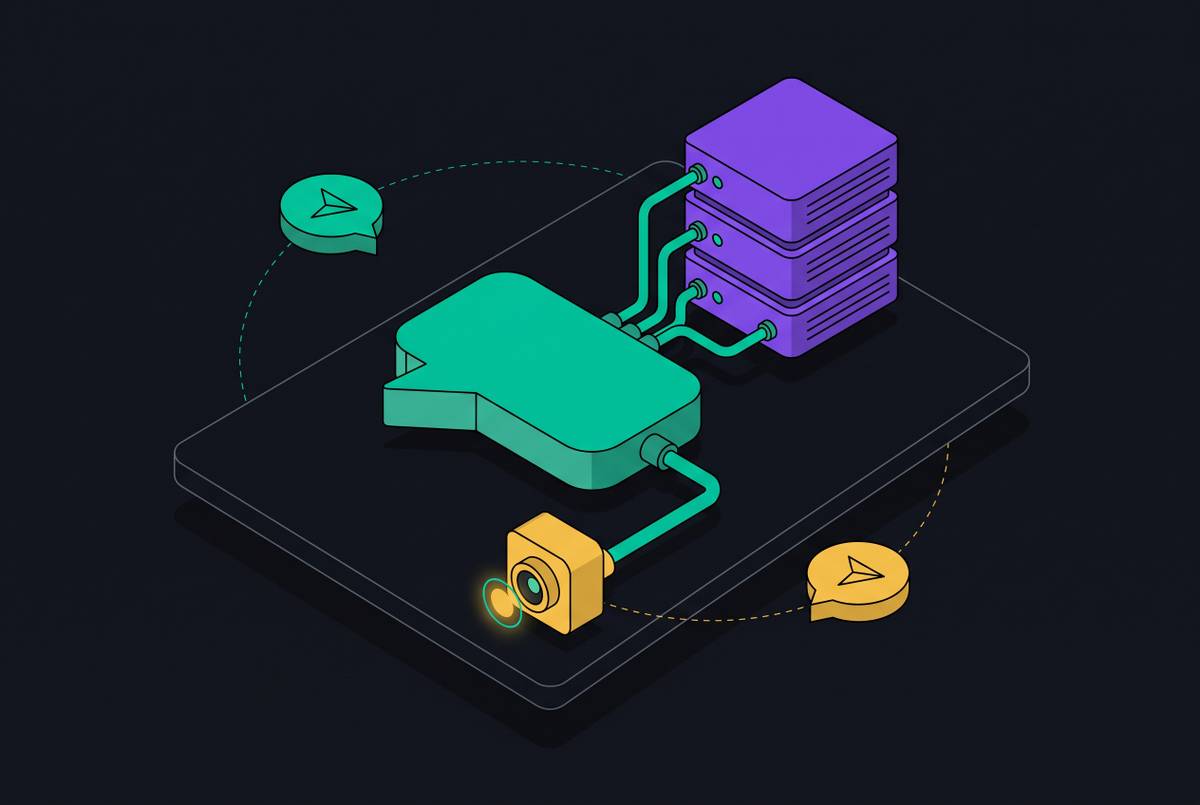
Gmail Delegation and Agent Email Automation at Scale
AI agents hitting Gmail's human-first design breaks at scale in three predictable ways.
Advertisement
Gmail's delegation model was built for one human handing an inbox to another, and that architecture breaks in specific, predictable ways the moment an AI agent takes the wheel. This piece walks through where the breaks happen, how OAuth and quota limits behave under agent control, and what infrastructure choices actually hold up when every customer needs their own agent running email.
Structural problems Gmail's delegation model creates for AI agents
Gmail delegation exists for the assistant-to-executive relationship. One person hands off to another person, both working through a browser, both operating under the same account identity. That's the whole design.
Google pushed this further in mid-2026, extending delegate access to the Gmail mobile apps, so a delegate can now read and compose from a phone as well as a desktop browser 7 Best Gmail AI Assistants in 2026: Gemini vs Top Alternatives | Lindy. Still built for humans, though.
Swap one of those humans for an AI agent and two assumptions that held for a decade stop holding. First, OAuth consent needs a person sitting in a browser session, and there's no supported way around that for a consumer Gmail account. Second, quota limits apply to the account, not to whatever's acting on it, so a fleet of agents sharing one Gmail account are all drawing from the same, single pool.
None of this is a bug someone forgot to patch. It's what happens when infrastructure built for signed-in humans gets asked to run autonomous software instead. A solo founder running one agent on one inbox can work around these limits without much trouble. An operator trying to spin up an agent for every customer they have cannot. That's the fork in the road this whole piece is about.
Gmail's OAuth and quota architecture under agent control
Start with OAuth, because it's the first wall anyone hits. Every single Gmail API connection needs a user to click "approve" inside a browser session. For an operator trying to provision agents across hundreds of customer accounts, that same five-second task turns into a manual bottleneck that doesn't scale, no matter how much engineering time gets thrown at it. There's no consumer-account workaround. Google built it that way on purpose.
Then there's quota. Limits are scoped to the account, not the agent sitting on top of it, so multiple agents sharing one Gmail account share that account's quota ceiling. An agent that triages, drafts, replies, and follows up across a genuinely busy inbox can burn through that budget faster than any human ever would, simply because it doesn't sleep and doesn't get bored.
Third wall: approval gates. As of July 2026, Claude's Gmail connector will send, reply, and forward, but by default it stops and asks for approval on every message. Team and Enterprise plans can turn that off and let it send without per-message sign-off. ChatGPT's Gmail connector works the same way in spirit: it sends, but only with the user's approval attached.
Both approval models make total sense for one person managing their own inbox. Neither holds up as an architecture once the goal shifts to autonomous, per-customer email handling running at scale. Put the walls together and the pattern is obvious: Gmail's API was designed to act on behalf of a signed-in human, and both autonomy and scale require something different.
Four distinct patterns of "delegation" in current AI email tooling
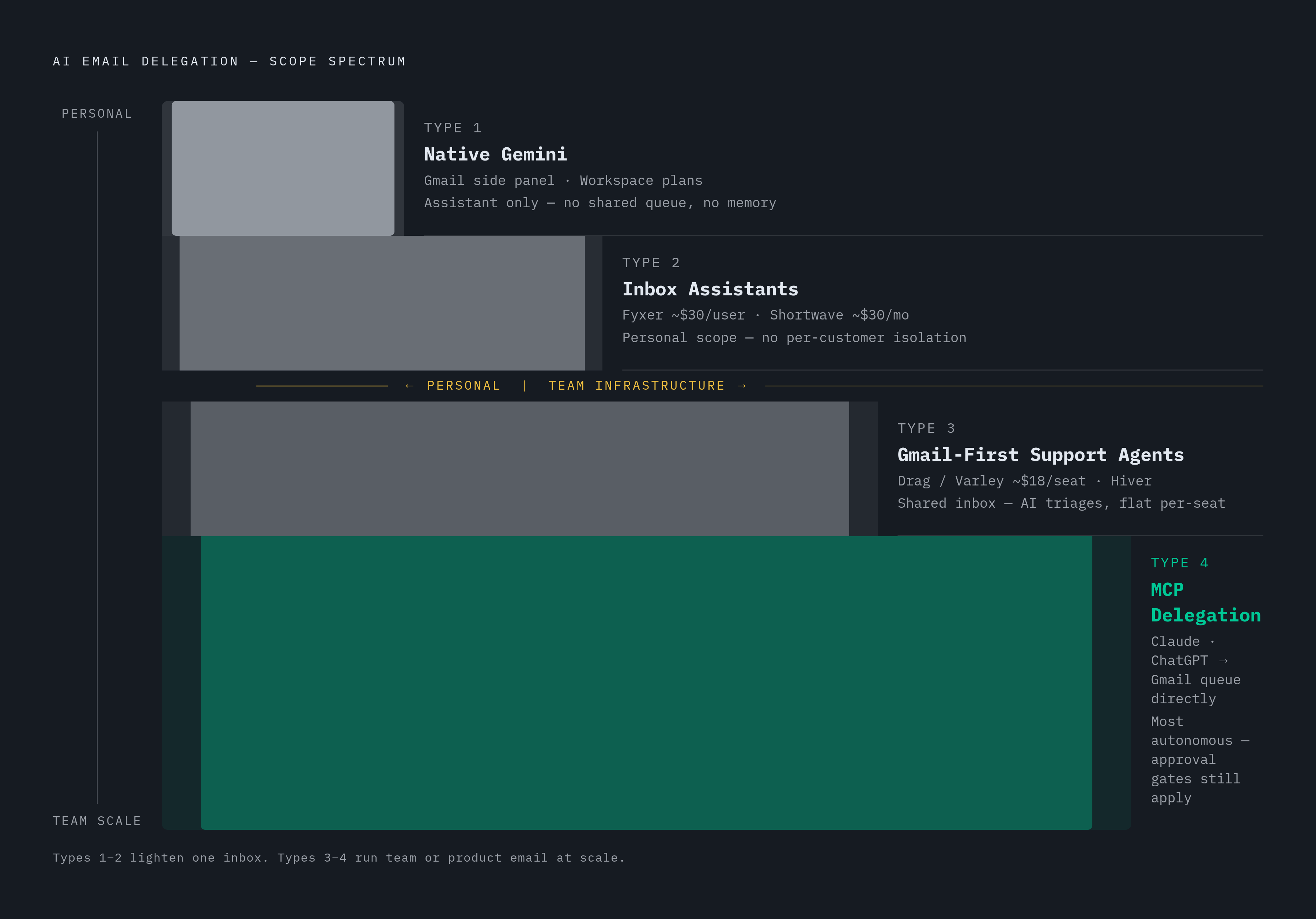
The tools on the market in 2026 split into four patterns, and mixing them up leads operators straight to the wrong infrastructure decision.
Type 1 is native Gemini, sitting in Gmail's side panel on paid Workspace plans. It drafts, it summarizes, it searches. It's an assistant, not an agent: no assigning, no tracking, no resolving, no view into a shared queue, no memory of policy. Fine for a solo founder. Not built for a team.
Type 2 is the inbox-assistant category, with tools like Fyxer and Shortwave The Best AI Agents for Gmail in 2026: Assistants, Support Agents, and…. These are personal-scope products that make one person's email lighter The Best AI Agents for Gmail in 2026: Assistants, Support Agents, and…. Fyxer runs about $30 a user a month drafting replies, triaging, and writing meeting notes The Best AI Agents for Gmail in 2026: Assistants, Support Agents, and…. Shortwave rebuilds Gmail into an AI-native client with multi-step commands, priced from roughly the same $30-a-month mark The Best AI Agents for Gmail in 2026: Assistants, Support Agents, and…. Neither one was built with a shared team queue in mind, and neither offers per-customer agent isolation.
Type 3 is the Gmail-first support agent, the category Drag (with its Varley agent) and Hiver occupy The Best AI Agents for Gmail in 2026: Assistants, Support Agents, and…. These are shared-inbox tools where the AI triages, drafts, and resolves conversations without pulling the team out of Gmail's own flow The Best AI Agents for Gmail in 2026: Assistants, Support Agents, and…. Drag's Varley starts around $18 and ships with an MCP server that outside AI tools can drive directly The Best AI Agents for Gmail in 2026: Assistants, Support Agents, and…. Flat per-seat pricing matters a lot here, since per-resolution fees add up fast once support volume climbs.
Type 4 is MCP as a delegation route in its own right: a general-purpose agent like Claude or ChatGPT connects straight to a Gmail-based queue, reads it, drafts in context, updates statuses, and kicks judgment calls back to a human. This is the newest of the four, and the one operators building agent-powered products should care about most.
Types 1 and 2 make one person's inbox lighter. Types 3 and 4 make a team's or a product's email actually work, and that distinction, not which model is under the hood, is what should drive the architecture decision. A support tool sitting on a shared inbox, driven by Claude through MCP, is a real production setup running today, and these stack in practice.
MCP as an emerging architecture for agent inbox access
MCP, the Model Context Protocol, is the newest delegation route on the board, and it's also the one most standard roundups skip entirely. The mechanics are straightforward: connect an inbox to whichever AI the operator already pays for, and through MCP, Claude or ChatGPT can read a Gmail-based queue, draft with full context, update statuses, and flag anything that needs a human call.
MCP does not fix the underlying limitations, and honesty about that matters. It still connects to an existing human inbox rather than giving the agent an identity of its own. A deeper, unchanged layer of OAuth consent and per-user quota limits still governs it. And the approval gates stay in place too, Claude still asks before it sends, by default.
OpenClaw fits into this picture as a connective layer. Its Gateway runs as a persistent server bridging AI agents and communication channels, email included. OpenClaw's workspace templates can hook into several email providers at once, Gmail API and Microsoft Graph API side by side, treating each mailbox as just another input channel governed by the same triage rules, drafting logic, and follow-up schedule.
MCP is a solid answer for a single operator's own workflow. Scaling that same pattern to one agent per customer runs straight back into the identity and isolation problem, and MCP alone doesn't solve that layer The Best AI Agents for Gmail in 2026: Assistants, Support Agents, and….
The case for an agent's own email identity, not access to a human's
Some agent workflows need to act on behalf of a person inside that person's inbox. Others need the agent to be its own inbox, with a recruiting agent coordinating interviews from an address that's entirely its own, a support agent replying to customers under its own name, and an operations agent processing invoices without ever touching a human's login. These are two different problems.
Nylas is a good example of the split. Nylas Connect ties agents into existing user accounts, but Nylas also runs a separate product, Agent Accounts, built specifically to provision independent, autonomous inboxes with their own identity. If the requirement is one identity per agent, that's a different provider pattern than delegated access to a human's inbox.
A handful of products are agent-native email infrastructure options for the July–August 2026 window. AgentMail gives software its own mailbox rather than a proxy into a human's. Robotomail runs the same philosophy: mailboxes for software, not stand-ins for people. Hostinger rolled out Agentic Mail as a newer feature of its Business Email product, positioned as agentic infrastructure with webhooks, REST APIs, and controls built for programmatic sending and receiving, aimed at teams that want mailboxes code and agents can reach directly alongside humans.
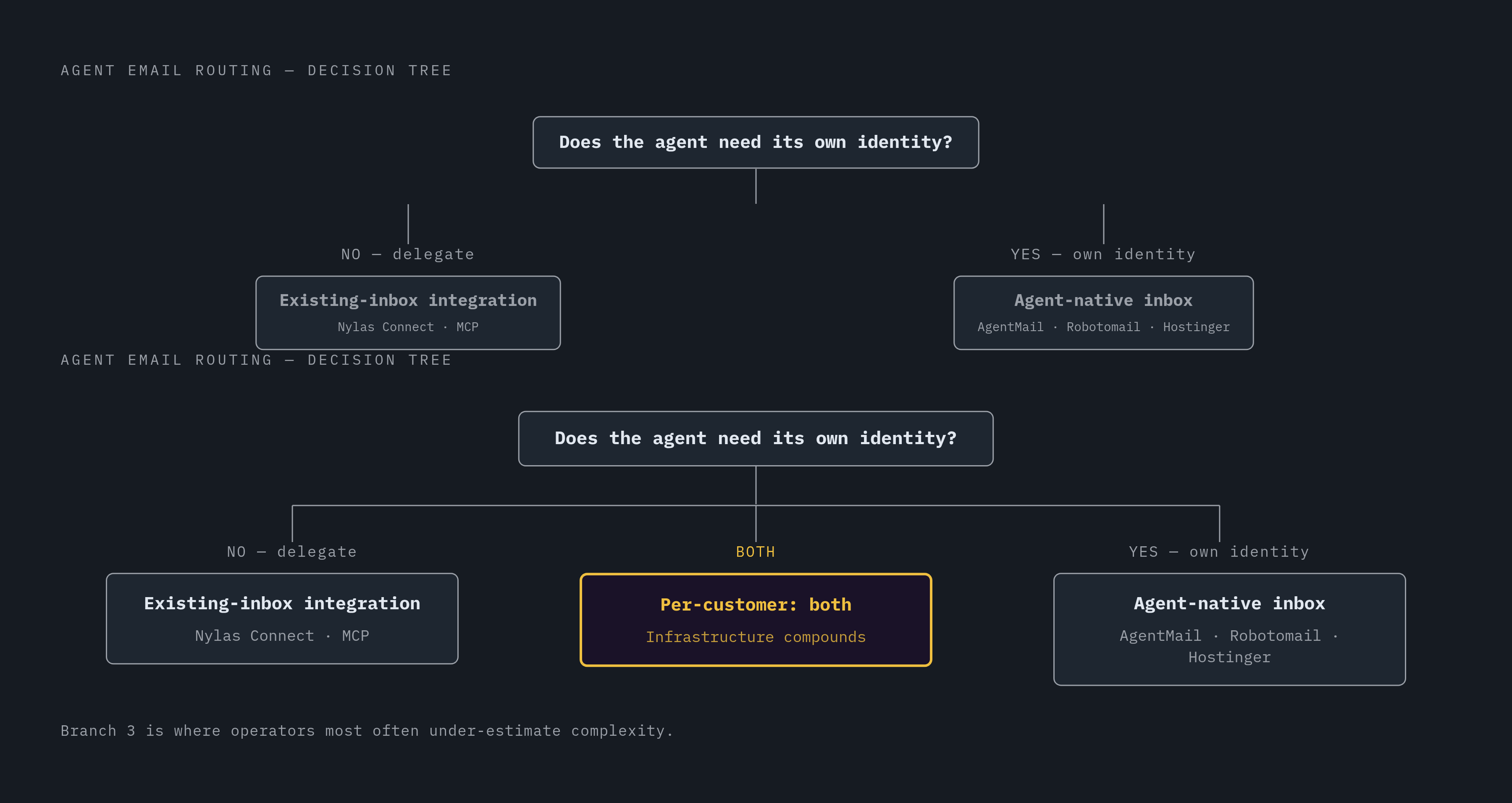
The decision tree is simple once it's laid out. Agent acting as a delegate for a human user: existing-inbox integration, Nylas or MCP. Agent needing its own persistent identity: an agent-native inbox provider. Product needing both, one human-delegate flow and one standalone agent identity, per customer: that's where the infrastructure choices start compounding on each other.
Per-user isolation as the right unit of scale for agent email deployments
Shared infrastructure across agents breaks in ways that are easy to predict and hard to walk back once they've happened. One customer's spike in activity exhausts shared quota and everyone else pays for it. One agent's OAuth token sitting in the same process space as another's is a credential leak waiting to happen. And when something goes wrong, there's no clean audit trail pointing to which agent's actions actually caused it.
The right unit of scale is one isolated, persistent agent per customer, provisioned automatically the moment that customer onboards, not hand-wired by a founder every single time a new signup comes in. Agents doing real autonomous work need environments isolated enough that they can act without exposing the host application, or worse, another customer's session, to risk.
For email specifically, per-customer isolation means per-customer credentials, per-customer quota tracking, and per-customer conversation history, and none of that is achievable when agents are sharing one Gmail account or one OAuth token. Gartner's forecast puts task-specific AI agents inside 40% of enterprise applications by the end of 2026, up from under 5% in 2025 7 Best Gmail AI Assistants in 2026: Gemini vs Top Alternatives | Lindy. That's not a distant hypothetical. Isolation is showing up in production deployments right now 7 Best Gmail AI Assistants in 2026: Gemini vs Top Alternatives | Lindy.
Composio's authentication layer for tractable per-user Gmail access
Authentication is the part of this that quietly eats the most engineering time. Every user has their own Gmail account, Gmail runs its own OAuth flow, and storing and refreshing tokens securely across hundreds or thousands of customers is the operational weight most founders badly underestimate going in.
Composio splits the problem into two pieces. An auth config is a reusable template holding an app's credentials and permission scopes. A connected account is one specific user's credential tied to that template. The recommended path in 2026 runs through hosted authentication, called Connect Link, where the user generates a link, signs into the service through it, and Composio stores the resulting connected account 7 Best Gmail AI Assistants in 2026: Gemini vs Top Alternatives | Lindy. OAuth flows, API keys, token refresh, the entire credential lifecycle, all of it is platform-managed, with permissions scoped down to the individual connection 7 Best Gmail AI Assistants in 2026: Gemini vs Top Alternatives | Lindy.
By August 11, 2026, Composio's catalogue had grown past 1,000 toolkits, Gmail, Slack, GitHub, Notion, WhatsApp, and plenty more, all reachable through one single MCP endpoint instead of a separate server per app. Composio also expanded custom-actions support in 2026, so teams can wrap internal, proprietary APIs into that same managed auth and execution layer sitting alongside Gmail. It works across the major agent frameworks, LangChain, CrewAI, Anthropic's Claude, OpenAI's function calling, and it handles rate limiting and error handling in addition to auth. Pricing shifted again on August 15, 2026, so anyone budgeting this should check composio.dev directly for current numbers rather than relying on older figures.
None of this makes per-user OAuth go away. What it does is turn that problem into something operational: provisioning a new customer's Gmail connection becomes one hosted link instead of a custom integration build from scratch.
The five-tool Google Workspace automation stack and the place of Gmail agents within it
Five tools keep coming up in every 2026 comparison of Google Workspace automation: Zapier, Make, Google's own Workspace Studio (its Gemini-powered automation layer that launched at the end of 2025), Google Apps Script, and n8n⟧c40⟧. Automating Workspace in 2026 means wiring Drive, Sheets, Gmail, and Docs together so agents act on events across all of them. The inbox is one channel feeding a connected system.
The time math behind this matters. A typical knowledge worker spends 20-30 minutes just scanning and triaging email before doing any substantive work, and recapturing that block is usually the first, most visible win once automation goes in. Taskade's guide on Workspace automation puts the broader gain at 8 to 12 hours saved per person each week once repetitive Workspace tasks move onto agents, and it names inbox triage as the single biggest time sink in the whole Workspace stack, with most people cutting their inbox time roughly in half within the first week of running an agent.
Where does the agent actually add value in that stack? Fixed Gmail filters already handle the deterministic stuff, sender rules, keyword matches in a subject line, and those should get cleaned up before anyone measures agent impact. Otherwise the agent ends up getting credit for sorting that a plain filter was already doing for free. The agent earns its keep on the judgment calls: reading tone, pulling a deadline out of a sentence that never states a date explicitly, comparing two quotes that came in days apart, drafting a reply that actually responds to what was asked. And the agent should slot into the label taxonomy that's already there rather than inventing its own, or per-category reporting turns into noise nobody can read.
For an operator, the real question was never "which automation tool." It's how the agent reads a Gmail event, acts on it, and hands the result to the next step in the workflow, and that answer involves the agent runtime, the auth layer (Composio or equivalent), and the inbox model, shared human account vs. agent-native inbox.
Choosing the right agent runtime when email is part of a larger agent workflow
The runtime choice comes down to what the agent is doing once email is only part of the job. If coding and repo work are the primary function, Codex (OpenAI) and Claude Code (Anthropic) are the runtimes to evaluate first. If the agent needs to communicate, remember context, schedule things, retrieve information, monitor for events, and operate across a handful of services at once, OpenClaw and Hermes are the more relevant pair.
OpenClaw, rebranded from Clawdbot by way of Moltbot in early 2026, is built for always-on operation across more than twenty messaging platforms. Its Gateway runs as a persistent server bridging agents and communication channels, which lines up naturally with an always-on email model, and its workspace templates handle several email providers running at once.
Hermes Agent, out of NousResearch, runs as a single background gateway process managing sessions, cron jobs, and voice messages, and it's MIT-licensed. No default model means no vendor lock-in: it works with OpenRouter, Nous Portal, OpenAI, Google's Gemini direct API, and local models alike. Its built-in learning loop accumulates skills across sessions, which matters directly for email workflows that need to remember a customer's preferences and history over time rather than starting cold each conversation.
Claude Code sits under Anthropic's governance, scoped to a workspace, with strong defaults against destructive actions, and it's built for coding tasks specifically. A pattern that's shown up in the Hermes community runs a cheaper model for the always-on loop and hands the hard coding passes off to Claude Code, letting each tool do the part it's actually built for. Codex, from OpenAI, runs each task in its own separate cloud environment, isolated from the others by design.
None of these runtimes were built with Gmail specifically in mind. What decides which one fits is the shape of the whole workflow the email sits inside, and that's the call every operator ends up making before a single agent goes live.
Sources
- The Best AI Agents for Gmail in 2026: Assistants, Support Agents, and the MCP Route
- 7 Best Gmail AI Assistants in 2026: Gemini vs Top Alternatives | Lindy
- Automate Google Workspace with AI in 2026 (Full Guide)
- Gmail Delegation: Why It Might Not Be for You · Missive Blog
- Why Gmail and SendGrid Don't Work for AI Agents (And What Does) | AgentMail
- AI Agent Email Automation: Build a Gmail/Outlook Agent That Triages, Drafts, and Follows Up — Without Code | ClawAgora
- Gmail MCP vs Gmail API for AI Agents (2026)